Making your first Command
Before registering your command, you should choose a name. In this example, we define it as a constant array. Using an array allows you to easily add aliases
const NAMES: [&str; 1] = ["test"];
// OR with aliases
const NAMES: [&str; 2] = ["test", "testcommand"];
You should also define a description, which will be displayed when players use the /help command
const DESCRIPTION: &str = "My first Command!";Pumpkin's Command API is heavily inspired by Mojang's Brigadier This system allows you to easily manage command syntax and provides automatic tab-completion for players
Implementing the Command Tree
use pumpkin::command::tree::CommandTree;

pub fn init_command_tree() -> CommandTree {
    CommandTree::new(NAMES, DESCRIPTION)
}
Registration and Permissions
To make the command usable, you must register both the Permission and the Command itself within your plugin context.
First, register the Permission. In this example, we set PermissionDefault::Allow so that everyone can use the command by default
#[plugin_method]
async fn on_load(&mut self, context: Arc<Context>) -> Result<(), String> {
    context.init_log();

    log::info!("Hello, Pumpkin!");

    context
        .register_permission(Permission::new(
            "plugin_docs_plugin:test",
            "Important Test Permission",
            PermissionDefault::Allow,
        ))
        .await
        .unwrap();


    Ok(())
}
Next, register the command using the permission string created above:
#[plugin_method]
async fn on_load(&mut self, context: Arc<Context>) -> Result<(), String> {
    context.init_log();

    log::info!("Hello, Pumpkin!");

    context
        .register_permission(Permission::new(
            "plugin_docs_plugin:test",
            "Important Test Permission",
            PermissionDefault::Allow,
        ))
        .await
        .unwrap();

    context
        .register_command(command::init_command_tree(), "plugin_docs_plugin:test")
        .await;

    Ok(())
}
Rebuild your plugin, move the plugins file into the plugins folder, and restart your server
Congrats!, The command is now registered and should be highlighted in-game and in console
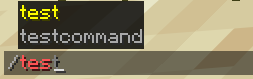
Executing the command right now likely thrown an Syntax error since no Command Executor has been implemented and the Command just does nothing
Adding an Executor
Lets create a super simple Command Executor without requiring and arguments
struct MyCommandExecutor;

impl CommandExecutor for MyCommandExecutor {
    fn execute<'a>(
        &self,
        sender: &'a CommandSender,
        server: &'a Server,
        args: &ConsumedArgs<'a>,
    ) -> CommandResult<'a> {
        Box::pin(async {
            Ok((1))
        })
    }
}