Creating Your First Command
Registering and handling custom commands in Pumpkin is designed to be developer-friendly, fast, and structured like Mojang's Brigadier system.
1. Quick Example
Here is a complete, minimal Rust plugin that registers a /hello command with permission checks and sends a response back to the player.
rust
use pumpkin_plugin_api::{
    command::{CommandHandler, CommandSender, ConsumedArgs, CommandError, Command},
    permission::{Permission, PermissionDefault},
    Context, Plugin, PluginMetadata, Server,
};

struct HelloExecutor;

impl CommandHandler for HelloExecutor {
    fn handle(
        &self,
        sender: CommandSender,
        _server: Server,
        _args: ConsumedArgs,
    ) -> Result<i32, CommandError> {
        sender.send_message("Hello from Pumpkin!");
        Ok(1)
    }
}

pub struct MyPlugin;

impl Plugin for MyPlugin {
    fn new() -> Self {
        MyPlugin
    }

    fn metadata(&self) -> PluginMetadata {
        PluginMetadata {
            name: "my_plugin".into(),
            version: env!("CARGO_PKG_VERSION").into(),
            authors: vec!["Developer".into()],
            description: "My first Pumpkin plugin".into(),
        }
    }

    fn on_load(&mut self, context: Context) -> pumpkin_plugin_api::Result<()> {
        // 1. Register permission node
        context.register_permission(&Permission {
            node: "my_plugin:hello".to_string(),
            description: "Allows executing the /hello command".to_string(),
            default: PermissionDefault::Allow,
            children: Vec::new(),
        })?;

        // 2. Build the command tree with aliases & executor
        let names = ["hello".to_string(), "hi".to_string()];
        let command = Command::new(&names, "Greets the player").execute(HelloExecutor);

        // 3. Register the command
        context.register_command(command, "my_plugin:hello")?;

        Ok(())
    }
}
2. In-Game Preview
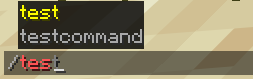
Once registered, your command automatically gains client-side autocompletion, syntax validation, and color highlighting in Minecraft:
3. How It Works
Step-by-Step Breakdown
Step 1: Define the Permission
Commands in Pumpkin require a permission node. Using PermissionDefault::Allow allows all players to execute it by default:
rust
context.register_permission(&Permission {
    node: "my_plugin:hello".to_string(),
    description: "Allows executing the /hello command".to_string(),
    default: PermissionDefault::Allow,
    children: Vec::new(),
})?;
Step 2: Build the Command Tree
Use Command::new to define primary names and aliases, then attach your CommandHandler struct with .execute(...):
rust
let names = ["hello".to_string(), "hi".to_string()];
let command = Command::new(&names, "Greets the player")
    .execute(HelloExecutor);
Step 3: Register with Context
Pass the command tree and the permission node string to context.register_command:
rust
context.register_command(command, "my_plugin:hello")?;Next Steps
- Explore complex subcommands and argument parsing in the Rock-Paper-Scissors Tutorial.
- Learn how to handle inventory and GUI interactions in plugin logic.