Creating Your First Command
Writing commands in C for Pumpkin is low-overhead, fast, and uses C WIT bindings.
1. Quick Example
Here is a complete C plugin file (main.c) that registers a /hello command with permission checks and sends a response back to the player.
c
#include <stdio.h>
#include "pumpkin.h"

void plugin_on_load(pumpkin_context_t ctx) {
    // 1. Register permission node
    pumpkin_permission_t perm = {
        .node = "my_c_plugin:hello",
        .description = "Allows executing the /hello command",
        .default_access = PERMISSION_DEFAULT_ALLOW
    };
    pumpkin_register_permission(ctx, &perm);

    // 2. Build and register command tree
    const char* names[] = {"hello", "hi"};
    pumpkin_command_t cmd = pumpkin_command_new(names, 2, "Greets the player");

    pumpkin_register_command(ctx, cmd, "my_c_plugin:hello");
}

int32_t plugin_handle_command(uint32_t command_id, pumpkin_sender_t sender, pumpkin_server_t server) {
    pumpkin_sender_send_message(sender, "Hello from C Plugin!");
    return 1;
}

pumpkin_metadata_t plugin_get_metadata() {
    pumpkin_metadata_t meta = {
        .name = "my_c_plugin",
        .version = "0.1.0",
        .description = "My first Pumpkin C plugin"
    };
    return meta;
}
2. In-Game Preview
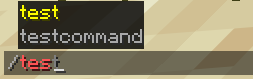
Once registered, your command automatically gains client-side autocompletion, syntax validation, and color highlighting in Minecraft:
3. How It Works
Step-by-Step Breakdown
Step 1: Define the Permission Struct
Populate a pumpkin_permission_t struct and call pumpkin_register_permission:
c
pumpkin_permission_t perm = {
    .node = "my_c_plugin:hello",
    .description = "Allows executing the /hello command",
    .default_access = PERMISSION_DEFAULT_ALLOW
};
pumpkin_register_permission(ctx, &perm);
Step 2: Build the Command Tree
Create the command tree by passing name array and description:
c
const char* names[] = {"hello", "hi"};
pumpkin_command_t cmd = pumpkin_command_new(names, 2, "Greets the player");
Step 3: Register Command & Handle Execution
Pass the command handle to pumpkin_register_command and handle responses inside plugin_handle_command:
c
pumpkin_register_command(ctx, cmd, "my_c_plugin:hello");Next Steps
- Check out the C Quick Start Guide to set up your compiler toolchain.