Creating Your First Command
Registering and handling custom commands in Pumpkin with Python is designed to be straightforward and expressive.
1. Quick Example
Here is a complete, minimal Python plugin (main.py) that registers a /hello command with permission checks and sends a response back to the player.
python
from pumpkin_api import (
    Plugin, PluginMetadata, register_plugin,
    permission, command, context, server
)

class HelloCommand:
    def handle(self, sender: command.CommandSender, srv: server.Server, args: command.ConsumedArgs) -> int:
        sender.send_message("Hello from Python Plugin!")
        return 1

class MyPlugin(Plugin):
    def metadata(self) -> PluginMetadata:
        return PluginMetadata(
            name="my_python_plugin",
            version="0.1.0",
            authors=["Developer"],
            description="My first Pumpkin Python plugin"
        )

    def on_load(self, ctx: context.Context) -> None:
        # 1. Register permission node
        ctx.register_permission(permission.Permission(
            node="my_python_plugin:hello",
            description="Allows executing the /hello command",
            default=permission.PermissionDefault.ALLOW,
            children=[]
        ))

        # 2. Build the command tree with aliases & executor
        cmd = command.Command(["hello", "hi"], "Greets the player")
        cmd.execute(HelloCommand())

        # 3. Register the command
        ctx.register_command(cmd, "my_python_plugin:hello")

register_plugin(MyPlugin)
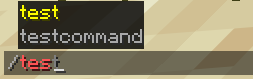
2. In-Game Preview
Once registered, your command automatically gains client-side autocompletion, syntax validation, and color highlighting in Minecraft:
3. How It Works
Step-by-Step Breakdown
Step 1: Define the Permission
Commands in Pumpkin require a permission node. Register it with permission.PermissionDefault.ALLOW to allow execution by default:
python
ctx.register_permission(permission.Permission(
    node="my_python_plugin:hello",
    description="Allows executing the /hello command",
    default=permission.PermissionDefault.ALLOW,
    children=[]
))
Step 2: Build the Command Tree
Create a command.Command instance with primary names and aliases, then attach your handler with .execute(...):
python
cmd = command.Command(["hello", "hi"], "Greets the player")
cmd.execute(HelloCommand())
Step 3: Register with Context
Pass the command tree and permission node string to ctx.register_command:
python
ctx.register_command(cmd, "my_python_plugin:hello")Next Steps
- Check out Events to handle player actions and server events in Python.
- Learn more about Basic Logic.