Creating Your First Command
Registering commands in Go with Pumpkin is built on standard Go idiom using TinyGo WASM compilation.
1. Quick Example
Here is a complete Go plugin file (main.go) that registers a /hello command with permission checks and sends a response back to the player.
go
package main

import (
	"github.com/Pumpkin-MC/pumpkin-api-go/api"
	"github.com/Pumpkin-MC/pumpkin-api-go/pkg/pumpkin_plugin_command"
	"github.com/Pumpkin-MC/pumpkin-api-go/pkg/pumpkin_plugin_context"
	"github.com/Pumpkin-MC/pumpkin-api-go/pkg/pumpkin_plugin_permission"
	_ "github.com/Pumpkin-MC/pumpkin-api-go/pkg/wit_exports"
)

type MyPlugin struct {
	api.DefaultPlugin
}

func (p *MyPlugin) Metadata() api.Metadata {
	return api.Metadata{
		Name:        "my_go_plugin",
		Version:     "0.1.0",
		Authors:     []string{"Developer"},
		Description: "My first Pumpkin Go plugin",
	}
}

func (p *MyPlugin) OnLoad(ctx *pumpkin_plugin_context.Context) {
	// 1. Register permission node
	ctx.RegisterPermission(pumpkin_plugin_permission.Permission{
		Node:        "my_go_plugin:hello",
		Description: "Allows executing the /hello command",
		Default:     pumpkin_plugin_permission.PermissionDefaultAllow(),
	})

	// 2. Build and register command tree
	cmd := pumpkin_plugin_command.New([]string{"hello", "hi"}, "Greets the player")
	ctx.RegisterCommand(cmd, "my_go_plugin:hello")
}

func (p *MyPlugin) HandleCommand(cmdID uint32, sender pumpkin_plugin_command.CommandSender) int32 {
	sender.SendMessage("Hello from Go Plugin!")
	return 1
}

func init() {
	api.RegisterPlugin(&MyPlugin{})
}

func main() {}
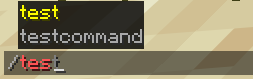
2. In-Game Preview
Once registered, your command automatically gains client-side autocompletion, syntax validation, and color highlighting in Minecraft:
3. How It Works
Step-by-Step Breakdown
Step 1: Register Permission
Call ctx.RegisterPermission inside OnLoad:
go
ctx.RegisterPermission(pumpkin_plugin_permission.Permission{
    Node:        "my_go_plugin:hello",
    Description: "Allows executing the /hello command",
    Default:     pumpkin_plugin_permission.PermissionDefaultAllow(),
})
Step 2: Build the Command Tree
Instantiate the command tree with pumpkin_plugin_command.New:
go
cmd := pumpkin_plugin_command.New([]string{"hello", "hi"}, "Greets the player")Step 3: Register & Execute
Register the command with ctx.RegisterCommand and handle execution in HandleCommand:
go
ctx.RegisterCommand(cmd, "my_go_plugin:hello")Next Steps
- Follow the Go Quick Start Guide to set up TinyGo compilation.
- Learn more about Basic Logic.